Avoiding Memory Leaks in Node Renderer SSR
Pro Feature — Available with React on Rails Pro.
Why Memory Leaks Happen in the Node Renderer
The Node Renderer reuses V8 VM contexts across requests for performance. Your server bundle is loaded once into a VM context and reused for every SSR request until the worker restarts.
This means module-level state persists across all requests for the lifetime of the worker process. Code that works fine in the browser — where each page navigation creates a fresh JavaScript context — can silently leak memory on the server.
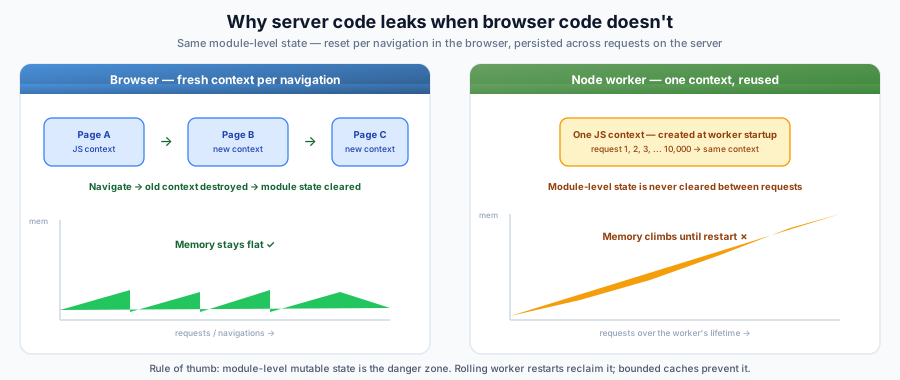
Migrating from ExecJS? ExecJS creates a fresh JavaScript context per render, so module-level state is automatically cleared. When you switch to the Node Renderer, code that "worked fine" before may start leaking because the same context is now reused across requests.
Common Leak Patterns
1. Module-level caches without eviction
Any module-level Map, Set, plain object, or array used as a cache will grow unboundedly because the module is loaded once and reused across all requests.
Leaks:
// cache lives forever — entries are never removed
const cache = new Map();

export function buildSignedUrl(imageUrl, width, height) {
  const key = `${imageUrl}-${width}-${height}`;
  if (cache.has(key)) return cache.get(key);

  const result = computeHmacSignature(imageUrl, width, height);
  cache.set(key, result); // grows with every unique input across all requests
  return result;
}
Fix: Add a max size with LRU eviction, clear the cache periodically, or remove it if the computation is cheap:
import { LRUCache } from 'lru-cache';

const cache = new LRUCache({ max: 1000 }); // bounded — evicts oldest entries
2. Lodash _.memoize and similar unbounded memoization
Lodash's _.memoize uses an unbounded Map internally. At module scope, it accumulates entries across all SSR requests forever.
Leaks:
import _ from 'lodash';

// Each unique argument adds a permanent entry
export const formatLocation = _.memoize((city, state) => {
  return `${city}, ${state}`.toLowerCase().replace(/\s+/g, '-');
});
Fix: Use a bounded LRU cache, or avoid memoization at module scope for functions called with diverse inputs during SSR.
3. Module-level Sets or arrays that accumulate
Leaks:
const SENT_EVENTS = new Set(); // grows with every unique event

export function trackEvent(event) {
  if (SENT_EVENTS.has(event.key)) return;
  SENT_EVENTS.add(event.key); // never removed
  sendToAnalytics(event);
}
Fix: Don't track client-side-only state (like analytics) during SSR. Guard with a server-side check:
export function trackEvent(event, railsContext) {
  if (railsContext.serverSide) return; // skip during SSR
  // ... client-only tracking
}
4. Third-party libraries with internal caches
Some libraries maintain internal caches or singletons that grow in SSR:
- Styled-components / Emotion: CSS-in-JS libraries can accumulate style sheets. Use
ServerStyleSheet(styled-components) orextractCritical(Emotion) and reset between renders - Apollo Client: GraphQL cache grows if not reset between renders
- MobX: Observer components can leak if
useStaticRenderingis not enabled (mobx-react < v7) - Amplitude / analytics SDKs: Event queues accumulate if initialized during SSR
- i18n libraries: Message catalogs may cache translations
Fix: Check if your libraries have SSR-specific configuration. Many provide a resetServerContext() or similar function. Initialize analytics and tracking libraries only on the client side.
5. Event listeners at module scope
If code registers event listeners at module scope during SSR, they accumulate across requests:
Leaks:
// Every SSR render adds another listener — they're never removed
process.on('unhandledRejection', (err) => {
  reportError(err);
});
Fix: Register listeners once (outside the render path), or guard with a flag:
let listenerRegistered = false;
if (!listenerRegistered) {
  process.on('unhandledRejection', (err) => reportError(err));
  listenerRegistered = true;
}
Diagnosing Memory Leaks
1. Monitor worker RSS over time
Watch the worker process memory. If RSS grows monotonically without plateauing, you have a leak:
# Check worker memory every 10 seconds
while true; do
  ps -o rss= -p <worker-pid> | awk '{printf "%.1f MB\n", $1/1024}'
  sleep 10
done
2. Take V8 heap snapshots
Option A: Built-in --heapsnapshot-signal (recommended)
Node provides a built-in flag that writes heap snapshots on a signal — no custom code required:
NODE_OPTIONS="--heapsnapshot-signal=SIGUSR2" node renderer/node-renderer.js
Then send kill -USR2 <worker-pid> at different times to capture snapshots. Each signal writes a .heapsnapshot file to the working directory.
This is the simplest approach, especially for production containers where you don't want to modify application code.
Option B: Custom signal handler
Note: If you are already using Option A (
--heapsnapshot-signal=SIGUSR2), do not also register aprocess.on('SIGUSR2', ...)handler — both will fire on every signal, producing duplicate snapshots. Remove one before using the other.
If you need more control (e.g., forced GC before the snapshot, custom filenames, or writing to a specific directory), add a custom handler:
const v8 = require('v8');

process.on('SIGUSR2', () => {
  if (global.gc) global.gc(); // force GC first (requires --expose-gc)
  const filename = v8.writeHeapSnapshot();
  console.log(`Heap snapshot written to ${filename}`);
});
Then send kill -USR2 <worker-pid> at different times.
Comparing snapshots
Load both .heapsnapshot files in Chrome DevTools (Memory tab → Load) and use the Comparison view to see which objects accumulated between snapshots.
Production container workflow
To diagnose leaks in a running container:
- Set
NODE_OPTIONS="--heapsnapshot-signal=SIGUSR2"in the container environment. IfNODE_OPTIONSis already set (e.g.,--max-old-space-size=1536), append the flag:NODE_OPTIONS="--max-old-space-size=1536 --heapsnapshot-signal=SIGUSR2". - Identify the worker PIDs:
ps aux | grep nodeinside the container. In a multi-worker setup you'll see one PID per worker — signal each one separately to get a snapshot from each process. - Capture a baseline snapshot:
kill -USR2 <worker-pid>. - Wait for traffic to accumulate (e.g., 10–30 minutes), then capture another:
kill -USR2 <worker-pid>. - Copy the
.heapsnapshotfiles from the container to your local machine (e.g.,kubectl cp,docker cp, orcpln workload exec). - Compare the two snapshots in Chrome DevTools to identify what grew between them.
3. Use --inspect for live profiling
Start the renderer with the --inspect flag to connect Chrome DevTools:
node --inspect renderer/node-renderer.js
Open chrome://inspect in Chrome, take heap snapshots, and use the "Comparison" view to see what objects accumulated between snapshots.
Mitigations
Set --max-old-space-size
Without this flag, V8 reads the container's memory limit and sets a very large heap ceiling. This causes V8 to defer garbage collection, amplifying any existing leaks.
Always set this for production:
NODE_OPTIONS=--max-old-space-size=1536 node renderer/node-renderer.js
Size it based on your container memory and worker count. For example, with 4GB container memory and 3 workers: 4096 / 3 ≈ 1365, round to 1400.
Enable worker rolling restarts
Rolling restarts are the primary safety net against memory leaks. They periodically kill and restart workers, reclaiming all accumulated memory:
const config = {
  // Restart all workers every 45 minutes
  allWorkersRestartInterval: 45,
  // Stagger individual restarts by 6 minutes to avoid downtime
  delayBetweenIndividualWorkerRestarts: 6,
  // Force-kill workers that don't restart within 30 seconds (value is seconds)
  gracefulWorkerRestartTimeout: 30,
};
Important: Both allWorkersRestartInterval and delayBetweenIndividualWorkerRestarts must be set for restarts to be enabled. See JS Configuration for details.
Size restart intervals for your traffic
The restart interval should be short enough that leaked memory doesn't fill the container:
- Low traffic / small bundles: 60–120 minutes may be fine
- High traffic / large bundles: 15–30 minutes
- If you're seeing OOMs: reduce the interval until stable, then investigate the root cause
The Browser vs. Server Mental Model
When writing code that runs during SSR, always ask: "If this module-level variable is never reset, will it grow with each request?"
| Pattern | Browser | Node Renderer |
|---|---|---|
const cache = {} at module scope | Cleared on navigation | Persists forever |
new Set() at module scope | Cleared on navigation | Persists forever |
_.memoize(fn) at module scope | Cleared on navigation | Persists forever |
React component state (useState) | Per-component lifecycle | Created and collected per render (OK) |
useEffect callbacks | Runs on client | Skipped during SSR (OK) |
useMemo inside components | Per-component lifecycle | Runs during SSR but result is per-render (OK) |
The rule of thumb: module-level mutable state is the danger zone. React component-level state and hooks are fine because React creates and discards them per render.
Audit Checklist
Use this to scan your server bundle code for potential leaks:
- Search for module-level
new Map(),new Set(),const cache = {},[]— are any of these unbounded? - Search for
_.memoizeormemoize(at module scope — are they called with diverse SSR inputs? - Search for
setIntervalwithout correspondingclearInterval— timers leak if not cleaned up (only relevant whenstubTimers: false) - Search for
process.on(or.addEventListener(at module scope — listeners accumulate if added per render - Check third-party libraries for SSR cleanup functions (
resetServerContext,useStaticRendering, etc.) - Verify
NODE_OPTIONS=--max-old-space-size=<MB>is set in production - Verify
allWorkersRestartIntervalanddelayBetweenIndividualWorkerRestartsare both configured