Node Renderer: Container Deployment
Pro Feature — Available with React on Rails Pro. Free in development, test, CI, and staging, and in production for small organizations, charities, schools, and hospitals; larger organizations subscribe at https://pro.reactonrails.com/ ($1,800 per year per organization). No license key is needed to run Pro.
This guide covers deploying the Node Renderer in containerized environments (Docker, Kubernetes, ControlPlane, etc.), including architecture options, performance tuning, memory management, error tracking, and troubleshooting.
Prerequisites
- React on Rails Pro v16.4.0 or later
- Node.js 22+ (LTS recommended)
- Ruby 3.1+ with Bundler
- The
react-on-rails-pro-node-renderernpm package installed in your project
HTTP Transport: h2c or HTTP/1.1
The Node Renderer and Rails client use cleartext HTTP/2 (h2c) by default. Keep that default when async props must cross an intermediary that may buffer an HTTP/1.1 request.
Deployments that require HTTP/1.1 can select it explicitly by pairing Node's
fastifyServerOptions: { http2: false } with Rails'
config.renderer_http_force_http2 = false. Regular rendering and response streaming remain available. Direct HTTP/1.1
connections can stream async props in both directions, but request-buffering or half-duplex intermediaries remain
unsupported for async props.
See Node Renderer Health and Readiness Endpoints for the complete paired configuration, password and private-network requirements, ALB target-group settings, connection-pool sizing, probe options, and safe rollout order.
Architecture Options
When running Rails and the Node Renderer in containers, you have three options, listed from simplest to most complex:
| Single Container | Sidecar Containers | Separate Workloads | |
|---|---|---|---|
| Complexity | Lowest | Medium | Highest |
| Scaling | Together | Together | Independent |
| Version alignment | Guaranteed | Guaranteed | Risk of drift |
| Networking | localhost | localhost | Service DNS |
| Per-process visibility | No | Yes | Yes |
| Generations per renderer during rollout | 1 when lifecycle is atomic | 1 when pod lifecycle is atomic | 2+ while app revisions overlap |
| RSC VM contexts per worker | 2 minimum; 4 default | 2 minimum; 4 default | 4 for old + new; increase for wider overlap |
| When to use | Default starting point | Need to diagnose OOM source | Need independent scaling at high replica counts |
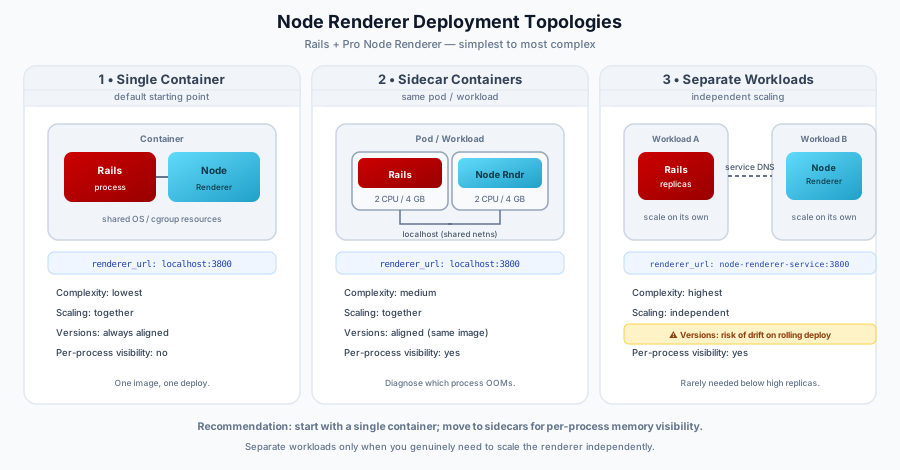
Option 1: Single Container (Default)
Rails and the Node Renderer run together in a single container. This is the simplest setup and the recommended starting point (the leftmost topology in the diagram above).
Both processes share the container's CPU and memory limits (cgroup resources); they do not communicate via shared-memory IPC.
Advantages:
- Simplest setup — One container, one image, one deploy.
- No networking config — Rails connects to the renderer via
localhostout of the box. - Guaranteed version alignment — Both processes always run from the same image.
- Lower overhead — Shared OS layer saves ~200–300 MB vs. separate containers.
When to move on: If you're experiencing OOM restarts and need to determine whether Rails or the Node Renderer is the culprit, move to sidecar containers for visibility.
Configuration:
# config/initializers/react_on_rails_pro.rb
ReactOnRailsPro.configure do |config|
  config.server_renderer = "NodeRenderer"
  config.renderer_url = "http://localhost:3800"
end
Option 2: Sidecar Containers
Rails and the Node Renderer run as separate containers within the same pod/workload, sharing the same lifecycle (the middle topology in the diagram above). Use this when you need to isolate and diagnose memory/CPU usage per process.
Advantages:
- Per-process visibility — See exactly which process is consuming memory and causing OOM kills.
- Independent resource limits — Set separate CPU/memory limits for Rails and the Node Renderer.
- Guaranteed version alignment — Both containers use the same image on deploy.
- Simpler networking — Rails still connects via
localhost.
Tradeoffs:
- Slightly more complex deployment config than a single container.
- Autoscaling logic may need adjustment (see Autoscaling Considerations).
Configuration:
# config/initializers/react_on_rails_pro.rb
ReactOnRailsPro.configure do |config|
  config.server_renderer = "NodeRenderer"
  config.renderer_url = "http://localhost:3800"
end
Option 3: Separate Workloads
Rails and the Node Renderer run as independent workloads with their own scaling. This is the most complex option and is rarely needed.
Advantages:
- Independent scaling — Scale the renderer independently of Rails.
- Isolated resource limits — OOM in the renderer doesn't affect Rails and vice versa.
Disadvantages:
- Version drift risk — During rolling deploys, Rails and the Node Renderer roll independently and briefly run different bundle versions, so the renderer can receive SSR requests for a bundle it hasn't cached. Mitigate this with a rolling-deploy adapter (Pro): it pre-seeds the new renderer with the draining bundle and makes the renderer-before-Rails ordering explicit. This risk (and that mitigation) is specific to this separate-workloads option — Options 1–2 share one lifecycle and cannot drift.
- Race conditions — Pods restart independently, which can cause transient connection errors.
- Network dependency — Renderer must be reachable via internal service DNS.
- Overkill for most setups — If you're running 2–4 replicas, independent scaling adds complexity without real benefit.
Configuration:
# config/initializers/react_on_rails_pro.rb
ReactOnRailsPro.configure do |config|
  config.server_renderer = "NodeRenderer"
  config.renderer_url = ENV.fetch("RENDERER_URL", "http://node-renderer-service:3800")
end
Recommendation: Start with a single container. Move to sidecar containers if you need per-process memory/CPU visibility (e.g., to diagnose OOM restarts). Separate workloads are rarely justified unless you have a specific need for independent scaling at high replica counts.
Rollout VM capacity and memory tradeoff
The Node Renderer retains compiled VM contexts per worker. Size its hard cap with:
maxVMPoolSize >= simultaneous bundle generations reaching one renderer × contexts per generation
Contexts per generation are 1 for SSR-only and 2 when RSC is enabled. The package default is 4, which covers the common separate-workload overlap of old and new RSC-enabled Rails revisions (2 × 2). Pooled VM memory grows approximately with workersCount × pooled contexts per worker, plus each worker's base V8 heap and source-map overhead. In-flight requests can temporarily retain evicted execution contexts and source maps outside the pool, so measure concurrent workload headroom with your own bundles before reducing container limits.
Topology changes the first factor:
- Single container: An atomic app revision normally sends Rails requests only to the renderer in the same container, so one generation reaches each renderer. The default leaves rollout headroom;
2is the RSC minimum only if that lifecycle guarantee is durable. - Sidecar containers:
localhostproves only a shared pod network namespace. Treat the topology as one generation per renderer only when both containers are in the same pod template and roll as one unit with aligned images and startup gates. It does not prove that Rails and Node inherited the same environment variables. - Separate workloads: A shared renderer service receives requests from draining and current Rails revisions. Use at least
4for RSC, deploy and warm the renderer first, and increase the cap if more than two Rails revisions can overlap.
An advanced deployment can use generation-affinity routing so each renderer receives only one Rails revision, but this package does not create, enforce, or diagnose that routing guarantee. Without such a platform-level guarantee, do not lower the generation factor. The revision-scoped pre-seed declaration supplies trusted current identity; incoming nonmatching requests are draining generations and cannot demote it.
react_on_rails:doctor uses the conservative old/new formula and reports whether capacity evidence is observed or unverified. It never treats a loopback renderer_url or a Rails-process environment variable as proof of live sidecar configuration. For a separate renderer workload, confirm MAX_VM_POOL_SIZE or maxVMPoolSize in that workload directly.
Pre-seeding populates the on-disk cache and emits an immutable declaration for the new revision. Set RENDERER_CURRENT_GENERATION_MANIFEST to that exact file so every worker compiles and pins the declared server plus optional RSC contexts before listening. Inactive nonmatching bundle sets drain after vmPoolRolloutDrainTimeout (60 seconds by default); see Node Renderer JavaScript Configuration.
The exact pooled-context upper bound across the live fleet is:
maximum pooled contexts = overlapping renderer replicas × effective workers per replica × maxVMPoolSize
Count old replicas plus the new rollout surge. workersCount: 0 is one effective worker. For each replica, budget its memory request and limit from the worker/pooled-context term plus measured master-process, base-heap, bundle-buffer, and safety overhead for source maps and evicted execution contexts held by concurrent in-flight requests. Multiply the per-replica request by the maximum overlapping replica count to plan the cluster reservation. A higher VM cap can stop rebuild churn while still causing OOMs if rollout surge or in-flight concurrency was omitted from capacity planning.
The revision-scoped declaration is the supported eager VM-prewarm seam. The built-in /ready check then proves that the answering worker's complete declared current set is compiled. If the hard cap cannot hold that set, startup fails explicitly; it never starts an unbounded pool or reports a false warm pass. Without the declaration, readiness and request-time compilation retain their legacy compatibility semantics.
Recommended rollout sequence by topology
Single container
- Build one aligned Ruby+Node image and keep the build-time seed as a fallback.
- Before accepting traffic, run the release-time seed against the draining deployment.
- Start NodeRenderer, start Rails, wait for renderer liveness, and run an internal authenticated Rails smoke render if the process supervisor supports a pre-readiness gate.
- Mark the combined container ready, then drain the old combined revision.
Sidecar containers in one pod
- Use a Ruby-capable init step to complete the release-time seed into the writable cache volume shared with the Node sidecar.
- Start the aligned Rails and Node sidecars from the same pod revision. Keep Rails public readiness false until Node liveness passes.
- Run internal authenticated Rails smoke requests for SSR and RSC when supported, then mark the pod ready.
- Roll and drain the pod as one lifecycle. A loopback URL alone is not evidence that the images, environment, cache volume, or lifecycle are aligned.
Separate workloads
- Complete the release-time seed for the new renderer revision and make the cache available to that workload.
- Deploy the renderer first on private networking with
RENDERER_PASSWORDauthentication. Wait until the seeded revision is live and ready. - Deploy a new Rails candidate configured for that renderer. Keep it out of public traffic while authenticated SSR/RSC smoke requests run when the platform supports this gate.
- Make new Rails live, drain old Rails, keep old/new VM capacity for the full drain window, and only then remove obsolete renderer capacity.
Never expose a separately deployed renderer directly to the public network. The Node vm module is not a security boundary; use private service discovery, firewall policy, and renderer password authentication.
Control Plane Deployment Shapes
For Control Plane deployments, choose the probe target based on where the node renderer runs. Control Plane configures
probes per container. The examples below keep the default h2c transport and therefore use tcpSocket or h2c-aware
exec probes. An HTTP/1.1 httpGet probe is also available when both sides use the paired
HTTP/1.1 configuration.
Control Plane Flow's default rails template models Rails as a
single-container standard workload. If you follow that template and run the renderer inside the Rails container,
configure the Rails workload's probes rather than looking for a separate node-renderer container. If you split the
renderer into its own container or workload, add renderer-specific probes there.
Same Rails Container (Rails and Renderer Co-Located)
Set the Rails renderer_url to http://localhost:3800. The renderer can keep the default localhost host binding.
Probe the rails container's Rails health endpoint, such as /up on port 3000 in Rails 7.1+ or a custom endpoint in
earlier Rails versions.
This also applies when a process supervisor starts Rails and the renderer together in the same container: probe the Rails container and let the Rails health endpoint cover the co-located renderer when needed.
When Rails and the renderer share one container, use one combined Rails health endpoint if you need to check both
processes. For example, make the Rails readiness endpoint perform a short TCP connection check to localhost:3800 and
return 503 if the renderer is unreachable.
Because this guide covers React on Rails Pro's Node Renderer, the Rails endpoint below reads the same
ReactOnRailsPro.configuration.renderer_url value used for SSR requests rather than requiring a second port environment
variable.
config/routes.rb:
# Override Rails 7.1+'s built-in /up route to add the renderer TCP check.
# If you already have custom /up logic, use a distinct path such as /healthz
# to avoid silently replacing existing health behavior.
get "up", to: "health#show"
Loading the Socket stdlib from an initializer keeps the controller body lean and outside the autoload boundary, which
matches Rails conventions for stdlib dependencies. If your environment already auto-requires stdlib (for example via
Bundler) the require below is harmless; placing it in an initializer is still preferred.
config/initializers/socket_require.rb:
# Load the Ruby stdlib Socket class once at boot for the Health controller's TCP check.
require "socket"
app/controllers/health_controller.rb:
# Inherits from ActionController::Base (not ApplicationController) to avoid
# app-level authentication callbacks on unauthenticated probe requests.
# `Socket` is loaded once at boot via config/initializers/socket_require.rb.
class HealthController < ActionController::Base
  def show
    # A successful TCP connect means the h2c listener is bound, not that cluster workers
    # are ready. Pair with the startup probe to shield liveness during boot.
    # In this same-container topology, Rails and the renderer share a network namespace,
    # so always probe localhost even if other deployment shapes use a service host.
    # connect_timeout is supported by the Ruby versions in this guide's prerequisites.
    renderer_url = ReactOnRailsPro.configuration.renderer_url
    raise ArgumentError, "renderer_url not configured" if renderer_url.nil? || renderer_url.empty?

    # Extract the explicit port from the URL authority, skipping any userinfo
    # (`user@`, `user:pass@`) and supporting bracketed IPv6 hosts. URI#port would
    # return 80/443 for URLs without an explicit port, so we read the string
    # directly and fall back to 3800 when no authority port is present.
    renderer_port = renderer_url[%r{://(?:[^/?#@]*@)?(?:\[[^\]]+\]|[^/?#:]+):(\d+)}, 1]&.to_i || 3800
    # Block form ensures the socket closes after a successful connect; the explicit
    # |_socket| parameter signals that the empty body is intentional, not a typo.
    Socket.tcp("localhost", renderer_port, connect_timeout: 1) { |_socket| }
    head :ok
  rescue SocketError, SystemCallError
    # Only renderer reachability failures map to 503. ArgumentError raised above
    # intentionally escapes as 500 so a misconfigured `renderer_url` stays visible
    # in logs and alerting.
    head :service_unavailable
  end
end
Topology-specific: This same-container example always probes
localhostand only borrows the port fromrenderer_url. Do not reuse it as-is for sidecar or separate-workload topologies where the renderer runs behind a different host.A missing
renderer_urlraisesArgumentErrorand surfaces as a 500 so the misconfiguration stays visible in logs and alerting. Only renderer reachability failures are converted to503.
Separate Container In The Same Workload
Keep the Rails renderer_url as http://localhost:3800. Use 0.0.0.0 for the renderer host when you rely on
tcpSocket probes; localhost is fine for exec-only probes.
Add h2c-aware exec probes against localhost:3800 or tcpSocket probes on the renderer port. For tcpSocket, bind
the renderer to 0.0.0.0 because Kubernetes and platform TCP probes are initiated by the kubelet and connect to the pod
or workload IP, not container-local loopback. Rails→renderer HTTP traffic over localhost still works inside the shared
pod network namespace (see Host Binding for Container Environments); only
externally-initiated probes need the 0.0.0.0 bind. exec probes run a command inside the container, so localhost
works there.
Probe YAML: For Control Plane readiness and liveness fields, reuse the individual
execortcpSocketprobe blocks from Kubernetes Sidecar Manifest. Attach them to the node-renderer container in this workload instead of to a separate Kubernetes pod spec.
Separate Node-Renderer Workload
Set the Rails renderer_url to http://<WORKLOAD_NAME>.<GVC_NAME>.cpln.local:3800, use 0.0.0.0 for the renderer
host, and add tcpSocket or h2c-aware exec probes to the node-renderer workload container. Expose the renderer port
internally, not publicly, unless required.
Use the same Control Plane probe fields as the same-workload case, but attach them to the separate node-renderer workload container.
Replace <WORKLOAD_NAME> with the renderer workload name and <GVC_NAME> with your Control Plane Global Virtual Cloud
name. Use your actual renderer port if it is not 3800; see Control Plane's
service-to-service endpoint format.
Dockerfile Example
Why the renderer entry point lives in a dedicated
renderer/directory: Production Docker builds commonly strip JavaScript sources after the client bundles are built, since the Rails app no longer needs them at runtime. Keeping the renderer entry point in its own top-level directory (separate fromclient/) makes it trivial to exclude from that cleanup — the Node Renderer process still needs its entry file and dependencies at runtime.
A minimal Dockerfile that bundles Rails and the Node Renderer in a single image:
FROM node:22-slim AS node
FROM ruby:3.3

# Copy Node.js from the official image (avoids curl-pipe-bash)
COPY --from=node /usr/local/bin/node /usr/local/bin/node
COPY --from=node /usr/local/lib/node_modules /usr/local/lib/node_modules
RUN ln -s /usr/local/lib/node_modules/npm/bin/npm-cli.js /usr/local/bin/npm

# jemalloc for Rails memory (adjust path for arm64: aarch64-linux-gnu)
# and curl for h2c health checks (`curl --http2-prior-knowledge`)
RUN apt-get update && apt-get install -y libjemalloc2 curl && rm -rf /var/lib/apt/lists/*
ENV LD_PRELOAD=/usr/lib/x86_64-linux-gnu/libjemalloc.so.2
ENV MALLOC_CONF="dirty_decay_ms:1000,muzzy_decay_ms:1000"

WORKDIR /app

# Install Ruby and Node dependencies
COPY Gemfile Gemfile.lock ./
RUN bundle install

COPY package.json package-lock.json ./
RUN npm ci

COPY . .

# Precompile assets
RUN bundle exec rake assets:precompile

# Expose Rails and Node Renderer ports
EXPOSE 3000 3800

# Start both processes with a process manager (overmind, foreman, etc.)
# See the Procfile example below
CMD ["overmind", "start", "-f", "Procfile"]
For the single-container pattern, use a process manager like overmind or foreman with a Procfile:
# Procfile
rails: bundle exec rails server -b 0.0.0.0 -p 3000
renderer: node renderer/node-renderer.js
Tip: For sidecar containers, use the same image but override the
CMD— one container runsbundle exec rails server, the other runsnode renderer/node-renderer.js(or your Node Renderer entry point).
Docker Compose Example
For local development with sidecar-like containers:
services:
  rails:
    build: .
    command: bundle exec rails server -b 0.0.0.0 -p 3000
    ports:
      - '3000:3000'
    environment:
      RENDERER_URL: 'http://renderer:3800'
    depends_on:
      renderer:
        condition: service_healthy

  renderer:
    build: .
    command: node renderer/node-renderer.js
    ports:
      - '3800:3800'
    environment:
      RENDERER_HOST: '0.0.0.0'
      NODE_OPTIONS: '--max-old-space-size=512'
    healthcheck:
      # --max-time 2 leaves a 1 s buffer below the 3 s healthcheck timeout so curl exits
      # cleanly with a non-zero code rather than being killed mid-request.
      test: ['CMD', 'curl', '-sf', '--max-time', '2', '--http2-prior-knowledge', 'http://localhost:3800/info']
      interval: 5s
      timeout: 3s
      retries: 5
      start_period: 10s
Note: In Docker Compose, the containers do not share a network namespace (unlike Kubernetes sidecars), so the renderer must bind to
0.0.0.0and Rails must connect via the service name (renderer). The Compose example uses--max-time 2withtimeout: 3sfor fast local feedback; the Kubernetes examples use--max-time 3withtimeoutSeconds: 5to allow more scheduler and node-load jitter.
Host Binding for Container Environments
By default, the Node Renderer binds to localhost. For sidecar containers in the same Kubernetes pod, that works because the containers share a network namespace. For separate workloads or Docker Compose setups without shared networking, bind to 0.0.0.0:
// renderer/node-renderer.js
import { reactOnRailsProNodeRenderer } from 'react-on-rails-pro-node-renderer';

const config = {
  host: '0.0.0.0',
  // ... other config
};

reactOnRailsProNodeRenderer(config);
Or via environment variable:
RENDERER_HOST=0.0.0.0
Security note: The renderer executes JavaScript via
vm.runInContext(), making it a remote code execution service. Binding to0.0.0.0exposes this to the network. Use it only when the renderer must be reachable across a network namespace (separate workloads, Docker Compose). Always setRENDERER_PASSWORDand place the renderer behind private networking when bound to0.0.0.0. See Network Security for the full threat model.
Optimizing Performance per Cost
Memory: Understanding the Growth Pattern
The Node Renderer's memory grows over time as it handles SSR requests. This is expected behavior — V8's garbage collector doesn't always return memory to the OS, even after objects are freed. In containerized environments with cgroup memory limits, this can trigger OOM kills.
Typical memory profile:
- Startup: ~500–600 MB for the renderer process with workers
- After hours of traffic: 2–3 GB+ depending on component complexity and traffic volume
- Rails container: Usually stabilizes at 2–4 GB depending on
WEB_CONCURRENCYandRAILS_MAX_THREADS
Constraining Node Memory
Use NODE_OPTIONS to cap V8's old-generation heap per worker:
NODE_OPTIONS="--max-old-space-size=512"
This tells V8 to trigger garbage collection more aggressively and limits each worker's heap. Adjust the value based on your component complexity:
| Component Complexity | Recommended max-old-space-size |
|---|---|
| Simple components | 256–512 MB |
| Medium (Redux, large props) | 512–768 MB |
| Complex (large data, many components) | 768–1024 MB |
Note: This setting applies per worker. Total renderer memory ≈
max-old-space-size × workersCount + overhead. If V8 hits the limit, the worker process exits and is automatically restarted by the cluster manager.
Worker Count Tuning
The default workersCount is CPU count minus 1, which may over-allocate in containers. Set it explicitly:
const config = {
  workersCount: parseInt(process.env.RENDERER_WORKERS_COUNT, 10), // Required — derive from the sizing formula below
};
Sizing guideline: Match worker count to expected concurrent SSR requests.
A rough formula (assuming each SSR render takes roughly half a full Rails request cycle, so one renderer worker can serve ~2 concurrent threads — adjust the divisor based on your measured render times):
renderer_workers ≥ (WEB_CONCURRENCY × RAILS_MAX_THREADS × ssr_request_ratio) / 2
Where ssr_request_ratio is the fraction of requests that need server rendering (often 30–60% for hybrid apps).
Example: With WEB_CONCURRENCY=4 and RAILS_MAX_THREADS=8 (32 total Rails threads), and ~50% of requests needing SSR:
renderer_workers ≥ (4 × 8 × 0.5) / 2 = 8 workers
Tip: Monitor CPU utilization per worker. If average CPU per worker is above 80%, you need more workers. If below 20%, you can reduce.
Rolling Worker Restarts
To mitigate memory growth, enable periodic worker restarts:
const config = {
  allWorkersRestartInterval: 360, // Restart all workers every 6 hours
  delayBetweenIndividualWorkerRestarts: 2, // 2 minutes between each worker restart
  gracefulWorkerRestartTimeout: 30, // Kill stuck workers after 30 seconds
};
This drains requests from each worker before restarting, so there's no downtime.
Container Resource Allocation
Recommended starting points for sidecar configuration:
| Container | CPU Request | CPU Limit | Memory Request | Memory Limit |
|---|---|---|---|---|
| Rails | 1–2 cores | 2–4 cores | 4 GB | 4 GB |
| Node Renderer | 1–2 cores | 2–4 cores | 4 GB | 4 GB |
Important: Set memory requests equal to limits for the renderer container so its memory budget is explicit. Kubernetes QoS is determined at the pod level, so you only get
GuaranteedQoS when every container in the pod has matching requests and limits. If using--max-old-space-size, set the container memory limit tomax-old-space-size × workersCount × 1.5to account for overhead.
jemalloc for Rails Memory
Consider using jemalloc as Ruby's memory allocator to reduce Rails memory fragmentation:
RUN apt-get install -y libjemalloc2
## Adjust the preload path for your image architecture:
##   amd64: /usr/lib/x86_64-linux-gnu/libjemalloc.so.2
##   arm64: /usr/lib/aarch64-linux-gnu/libjemalloc.so.2
ENV LD_PRELOAD=/usr/lib/x86_64-linux-gnu/libjemalloc.so.2
ENV MALLOC_CONF="dirty_decay_ms:1000,muzzy_decay_ms:1000"
This won't help the Node Renderer (which uses V8's allocator), but can significantly reduce Rails container memory.
Graceful Shutdown
During rolling deploys and scale-down events, containers receive SIGTERM before being killed. Both Rails and the Node Renderer need to handle this gracefully to avoid dropping in-flight requests.
Node Renderer
The Node Renderer's cluster manager handles SIGTERM automatically — it stops accepting new connections and waits for in-flight requests to complete before exiting. No additional configuration is needed.
Set terminationGracePeriodSeconds in your pod spec to give workers enough time to drain:
spec:
  terminationGracePeriodSeconds: 60 # default is 30; increase if SSR requests are slow
Rails
Rails handles SIGTERM via Puma's built-in graceful shutdown. Ensure terminationGracePeriodSeconds exceeds your longest expected request duration.
Tip: If either process doesn't shut down within
terminationGracePeriodSeconds, Kubernetes sendsSIGKILL. Monitor for exit code 137 in your logs, which may indicate the grace period is too short rather than an OOM kill.
Autoscaling Considerations
When using sidecar containers, autoscaling becomes more nuanced because CPU and memory metrics are aggregated across both containers.
CPU-Based Autoscaling
If you previously scaled on CPU at 75%, you may need to adjust:
- Rails-heavy traffic (mostly API/JSON responses): Rails CPU spikes, but the renderer is idle. The pod-level CPU average may underreport Rails load.
- SSR-heavy traffic: Both containers are active. Pod-level CPU is more representative.
Recommendation: If your orchestrator supports per-container metrics (e.g., Kubernetes custom metrics), scale based on the Rails container's CPU. Otherwise, lower the threshold (e.g., to 60%) to account for the averaging effect.
Scaling with Separate Workloads
With separate workloads, scale each independently:
- Rails: Scale on CPU utilization or request queue depth.
- Node Renderer: Scale on CPU utilization per worker.
Tracking and Responding to Errors
Startup Errors: ERR_STREAM_PREMATURE_CLOSE
During container startup, you may see ERR_STREAM_PREMATURE_CLOSE errors from Fastify. This occurs when Rails sends render requests before all Node Renderer workers are ready.
Mitigation:
Probe semantics, timing values, and curl command flags are documented canonically in JS Configuration: Configuring Startup, Readiness, and Liveness Probes. The full copy-paste YAML lives in Kubernetes Sidecar Manifest below. Update the JS Configuration section first when tuning thresholds, then reflect the change in the manifest.
-
Health check endpoint - The Node Renderer exposes a built-in
/infoendpoint that returns the node version and renderer version. The default cleartext HTTP/2 listener requires atcpSocketprobe or anexecprobe with an h2c-aware client such ascurl --http2-prior-knowledge. If the renderer and Rails client both use HTTP/1.1, a KuberneteshttpGetprobe can reach the renderer directly. For a custom/healthroute with more granular checks, see JS Configuration: Adding a Health Check Endpoint. -
Startup probe — A startup probe is the primary mitigation for this error. It defers readiness and liveness until the renderer has bound its port, so Rails only sends render requests after workers are ready:
startupProbe:
  tcpSocket:
    port: 3800
  initialDelaySeconds: 10
  periodSeconds: 5
  failureThreshold: 6
timeoutSeconds: 1 -
Readiness and liveness probes — Configure these alongside the startup probe so Rails only routes requests to a healthy renderer and stuck containers get restarted. See Configuring Startup, Readiness, and Liveness Probes for probe-style choices, timing values, and curl command guidance, and Kubernetes Sidecar Manifest for the full copy-paste YAML.
Security: See the canonical
/infosecurity note for the unauthenticated-access caveat whenpasswordis configured.
OOM Tracking
Distinguish between Rails and Node Renderer OOM kills by checking container-level exit codes:
- Exit code 137: Process received SIGKILL — commonly OOM from cgroup limit, but can also be forced termination (grace-period expiry, liveness probe failure). Check
kubectl describe podforReason: OOMKilledto confirm OOM. - Exit code 1: Application crash (check logs for stack trace).
With sidecar containers, your orchestrator should report which container was OOM-killed. Use this to tune resource limits for the specific container rather than increasing the entire pod.
Error Reporting
See Error Reporting and Tracing for setting up Sentry, Honeybadger, or other error tracking with the Node Renderer.
Logging
Set log levels to capture useful information without noise:
const config = {
  logLevel: 'info', // General renderer logs
  logHttpLevel: 'error', // Only log HTTP errors (not every request)
};
In production, logLevel: 'warn' is sufficient unless actively debugging.
Kubernetes Sidecar Manifest
A complete pod spec for the sidecar pattern. This is the canonical copy-paste YAML for renderer probes — other sections reference it instead of repeating the full block.
The manifest uses an h2c-aware exec probe for readiness and a tcpSocket probe for liveness. Keep that split unless
you intentionally need stricter liveness detection and have verified curl HTTP/2 support in the image. Probe timing
values and curl command guidance are canonical in
JS Configuration: Configuring Startup, Readiness, and Liveness Probes;
update that section first when tuning thresholds and reflect the change here.
apiVersion: apps/v1
kind: Deployment
metadata:
  name: rails-app
spec:
  replicas: 2
  selector:
    matchLabels:
      app: rails-app
  template:
    metadata:
      labels:
        app: rails-app
    spec:
      terminationGracePeriodSeconds: 60
      containers:
        - name: rails
          image: your-app:latest
          command: ['bundle', 'exec', 'rails', 'server', '-b', '0.0.0.0']
          ports:
            - containerPort: 3000
          env:
            - name: RENDERER_URL
              value: 'http://localhost:3800'
            - name: LD_PRELOAD
              value: '/usr/lib/x86_64-linux-gnu/libjemalloc.so.2'
            - name: MALLOC_CONF
              value: 'dirty_decay_ms:1000,muzzy_decay_ms:1000'
          resources:
            requests:
              cpu: '1'
              memory: '4Gi'
            limits:
              cpu: '2'
              memory: '4Gi'

        - name: node-renderer
          image: your-app:latest # Same image as Rails
          command: ['node', 'renderer/node-renderer.js']
          ports:
            - containerPort: 3800
          env:
            - name: RENDERER_HOST
              value: '0.0.0.0' # Bind to all interfaces for pod-network access
            - name: NODE_OPTIONS
              value: '--max-old-space-size=512'
            - name: RENDERER_WORKERS_COUNT
              value: '4'
          resources:
            requests:
              cpu: '1'
              memory: '4Gi'
            limits:
              cpu: '2'
              memory: '4Gi'
          startupProbe:
            tcpSocket:
              port: 3800
            initialDelaySeconds: 10
            periodSeconds: 5
            failureThreshold: 6
            timeoutSeconds: 1
          readinessProbe:
            # Add initialDelaySeconds here if no startupProbe is configured.
            # Kubernetes 1.20+ defers readiness/liveness until the startupProbe succeeds.
            exec:
              command:
                - curl
                - -sf
                - --max-time
                - '3'
                - --http2-prior-knowledge
                - http://localhost:3800/info
            timeoutSeconds: 5
            periodSeconds: 5
            failureThreshold: 3
          livenessProbe:
            # Add initialDelaySeconds here if no startupProbe is configured.
            # Kubernetes 1.20+ defers readiness/liveness until the startupProbe succeeds.
            tcpSocket:
              port: 3800
            # TCP handshakes should complete quickly; exec/H2 uses timeoutSeconds: 5.
            timeoutSeconds: 1
            periodSeconds: 10
            failureThreshold: 3
Readiness endpoint: The manifest uses
/infofor copy-paste safety because that endpoint is built in. Replace/infowith/healthin the readiness probe after registering that route viaconfigureFastifyif readiness should wait for renderer-specific warm-up checks.
Note: Both containers use the same Docker image, ensuring the React on Rails gem and Node Renderer package versions are always aligned.
Troubleshooting
Container restarts frequently (OOM)
- Check which container is OOM-killed — Use your orchestrator's events/logs to identify if it's Rails or the Node Renderer.
- If Node Renderer — Set
NODE_OPTIONS="--max-old-space-size=512"and enable rolling restarts with bothallWorkersRestartIntervalanddelayBetweenIndividualWorkerRestarts. - If Rails — Consider jemalloc and review
WEB_CONCURRENCY/RAILS_MAX_THREADSsettings. - Monitor over time — Memory growth is gradual. Monitor for 8+ hours to see the steady-state memory usage.
Renderer connection refused after deploy
- Verify the renderer container is running and healthy.
- For sidecars: Check that the renderer binds to
localhost(default) or0.0.0.0. - For separate workloads: Verify DNS resolution and that
config.renderer_urlmatches the renderer's service endpoint. - Check for readiness probe failures that may have removed the renderer from the service.
Different versions after deploy (separate workloads)
The React on Rails gem and Node Renderer package have a protocol version. If they mismatch, render requests return an error. To avoid this:
- Sidecars: Both containers use the same image, so versions are always aligned.
- Separate workloads: Deploy both workloads simultaneously. If your orchestrator doesn't support atomic multi-workload deploys, consider switching to sidecars.
High latency on SSR requests
- Check worker count — If all workers are busy, requests queue up. Increase
workersCountor scale replicas. - Check
max-old-space-size— If set too low, frequent GC pauses increase latency. Increase the limit. - Profile components — Use
node --inspectto profile server-rendering code. See Profiling Server-Side Rendering Code.
Startup race condition between Rails and Node Renderer
In sidecar configurations, Rails may start before the Node Renderer is ready. Configure renderer_request_retry_limit in Rails to retry failed connections:
ReactOnRailsPro.configure do |config|
  config.renderer_request_retry_limit = 5  # default: 5
end
This handles transient startup ordering issues. For a more robust solution, add a startup dependency or init container that waits for the renderer port to accept TCP connections, or queries /info with an h2c-aware client (for example, curl --http2-prior-knowledge).
ControlPlane-Specific Notes
When deploying on ControlPlane:
- Port configuration: Use
process.env.PORTfor the renderer port if running as a standalone workload. ControlPlane injects thePORTenvironment variable for the primary container. - Sidecar setup: Configure separate CPU and memory limits per container in your workload definition. In ControlPlane, sidecar containers are defined alongside the main container in the same workload spec.
- Autoscaling: ControlPlane uses workload-level metrics for autoscaling — see Autoscaling Considerations above. If you need per-container scaling, use separate workloads instead of sidecars.
- Health checks: ControlPlane supports readiness and liveness probes in the same format as Kubernetes. Configure them as shown in the Kubernetes Sidecar Manifest section.